
This chapter introduces common Clash features and how to use and configure them.
Clash uses YAML (YAML Ain't Markup Language) for its configuration files. YAML is designed to be easy to read, write, and parse, and is commonly used for configuration.
Understand how Clash works
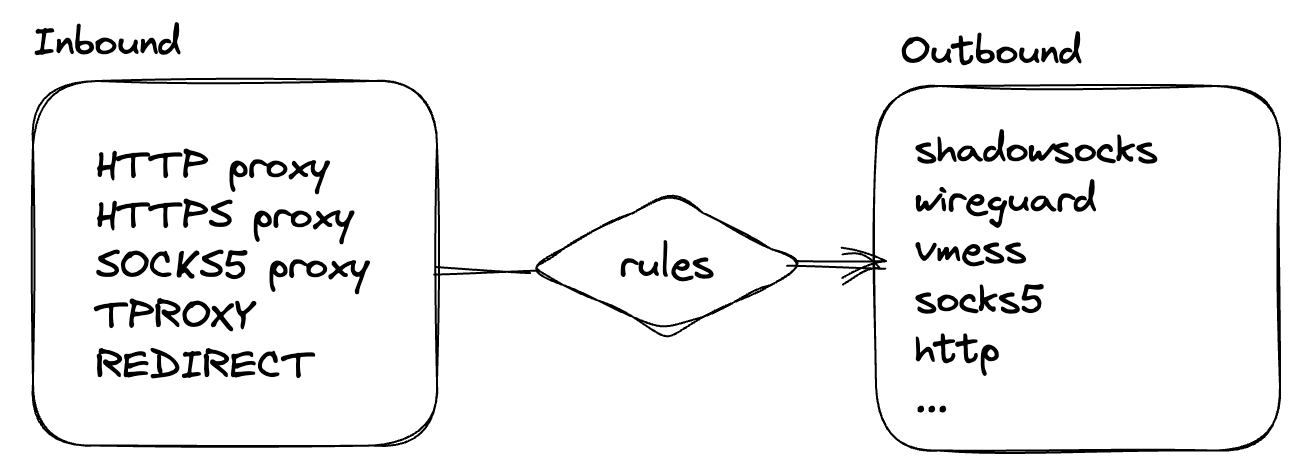
Before continuing, it is important to understand how Clash works. There are two key parts:
Inbound Proxies
Inbound is the component that listens locally. It opens a local port and accepts incoming connections. When a connection arrives, Clash evaluates the rules in the configuration and decides which Outbound should receive it.
Outbound Proxies
An Outbound is the component that connects to the remote endpoint. Depending on the configuration, it can be a specific network interface, a proxy server, or a policy group.
Rule-based routing
Clash supports rule-based routing, which lets you route packets to different outbounds according to various rules. Define rules in the rules section of the configuration file.
Many rule types are available, each with its own syntax. The general rule syntax is:
# 类型,参数,策略(,no-resolve)
TYPE,ARGUMENT,POLICY(,no-resolve)
The next guide explains how to configure rules in more detail.